


Your laptop camera in 2026 still looks like you're recording from a basement. A good webcam for working from home changes that for 45 to 300 EUR - the only question is how much you actually need. We went through 7 models, from the EMEET budget option to Razer's 4K camera with a Sony sensor, to tell you which one fits your work style.
For a complete home office setup, check out our guide to USB-C hubs for laptops and monitor roundup for working from home.
Quick Overview - 7 Webcams for Working from Home 2026
| Model | Resolution | FOV | Microphone | Price |
|---|---|---|---|---|
| Logitech MX Brio 4K | 4K@30 / 1080p@60 | 65-90° | Yes (AI dual) | 229.99 EUR |
| Logitech Brio 500 | 1080p@30fps | 65-90° | Yes (dual) | 109.99 EUR |
| Razer Kiyo Pro Ultra | 4K@24 / 1080p@60 | 72-82° | Yes (omni) | 299.99 EUR |
| Elgato Facecam MK.2 | 1080p@60fps | 84° | No | 149.99 EUR |
| Anker PowerConf C200 | 2K@30fps | 65-95° | Yes (dual) | 59.99 EUR |
| EMEET SmartCam C960 | 1080p@30fps | 90° | Yes (dual AI) | 44.99 EUR |
| Microsoft Modern Webcam | 1080p@30fps | 74° | Yes | 74.99 EUR |
1. Logitech MX Brio 4K - Best Webcam for Working from Home
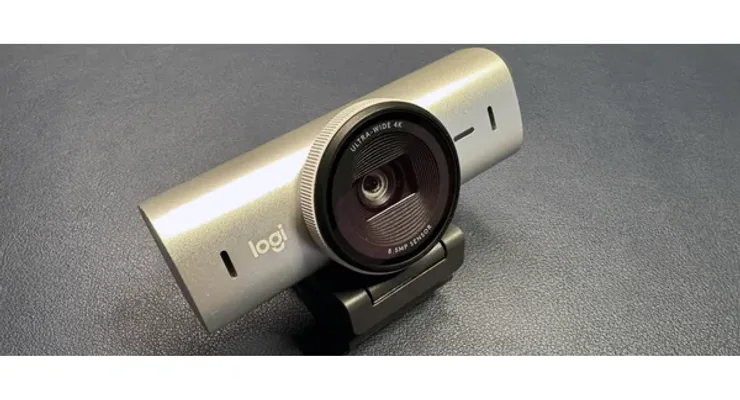 Photo: Logitech, Logitech.com
The Logitech MX Brio is the top-tier webcam for people who spend hours on video calls every day and refuse to compromise. Four megapixels and a VCM (Voice Coil Motor) autofocus speed up face tracking compared to previous models, and the adjustable FOV from 65° to 90° means you don't have to rearrange your desk when conditions change.
Platforms like Teams and Zoom cap video at 1080p, but the 4K sensor still has an advantage - a larger sensor captures more light, which you'll notice directly on evening calls without studio lighting. Dual beamforming microphones with AI noise reduction make a real difference in open spaces with background noise.
| Specification | Value |
|---|---|
| Resolution | 4K@30fps / 1080p@60fps |
| Field of View (FOV) | 65° / 78° / 90° adjustable |
| Autofocus | VCM closed-loop, very fast |
| Microphone | Dual beamforming, AI noise reduction |
| Connection | USB-A (USB-C adapter included) |
| Compatibility | Windows, macOS, ChromeOS |
| Price | 229.99 EUR |
Pros: Outstanding 4K in low light thanks to the large sensor, fastest and most precise autofocus in its class, three FOV settings, AI dual microphones filter background noise
Cons: Price above 200 EUR is a tough call for many, Teams and Zoom cap video at 1080p anyway
Our opinion: If you have three or more video calls a day and work in rooms with changing lighting, the MX Brio is an investment worth making. For occasional calls once a week - too expensive.
2. Logitech Brio 500 - Reliable Webcam for Home Office
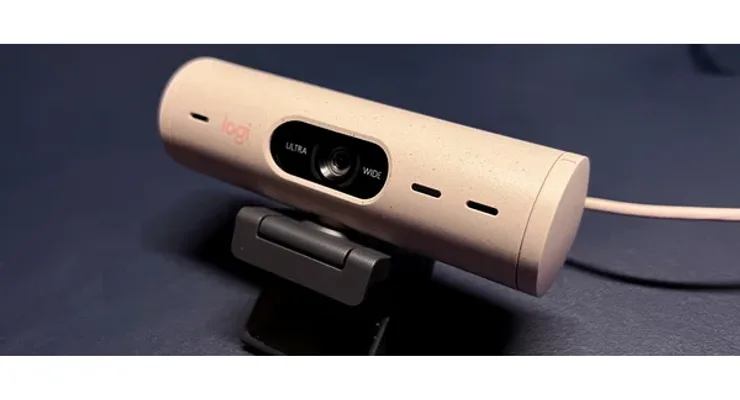 Photo: Logitech, Logitech.com
The Logitech Brio 500 hits the sweet spot - 1080p is enough for every video platform, RightLight 4 technology solves 80% of lighting problems, and USB-C means no adapters on modern laptops. The physical privacy shutter is a small thing that quickly becomes a habit.
RightSight automatically frames your face even when you move around - useful for people who don't sit perfectly still for an hour. According to (Source), the Brio 500 stands out in low-light conditions where cheaper models fail.
| Specification | Value |
|---|---|
| Resolution | 1080p@30fps / 720p@60fps |
| Field of View (FOV) | 65° / 78° / 90° (Show View, Standard, Portrait) |
| Autofocus | Yes, with face tracking |
| Microphone | Dual, noise reduction |
| Connection | USB-C |
| Physical shutter | Yes |
| Price | 109.99 EUR |
Pros: RightLight 4 handles low-light well, USB-C without adapters on modern laptops, AI RightSight auto-framing, physical privacy shutter
Cons: No 4K unlike the pricier MX Brio, autofocus sometimes slower than premium models on sudden movements
Our opinion: For most home office users, the Brio 500 is the end of the search. Solid image, USB-C, physical shutter, and a price under 110 EUR. No reason to pay more if you're not streaming.
3. Razer Kiyo Pro Ultra - Webcam for Dark Rooms
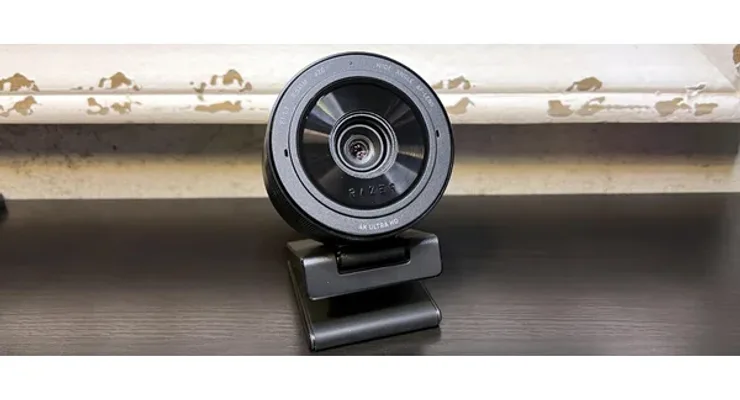 Photo: Razer, Razer.com
The Razer Kiyo Pro Ultra is the only webcam on the market with a 1/1.2" Sony STARVIS 2 sensor and F/1.7 aperture - a combination that delivers DSLR-like image quality even on video calls. Dark home office without a ring light? The Kiyo Pro Ultra works without flash where every other model delivers grainy footage.
According to (Source), the camera is especially impressive in low light where other models can't keep up. AI autofocus and face tracking work at the hardware level, no extra software required. For working from home it's overkill - but for streamers and YouTube creators who work in difficult lighting conditions, this is the only real answer.
| Specification | Value |
|---|---|
| Resolution | 4K@24fps / 1080p@60fps / HDR@30fps |
| Sensor | 1/1.2" Sony STARVIS 2 |
| Aperture | F/1.7 |
| Field of View (FOV) | 72° - 82° adjustable |
| Autofocus | AI face tracking and autofocus |
| Microphone | Built-in omnidirectional |
| Price | 299.99 EUR |
Pros: F/1.7 and large sensor eliminate the need for studio lighting, 60fps at 1080p for smooth motion, AI autofocus works without Synapse software, HDR support
Cons: Most expensive on the list - over 300 EUR is a serious investment, overkill for standard Teams/Zoom calls, omnidirectional mic picks up more noise than dual mics
Our opinion: If your workspace has poor natural light and you're not planning to buy a ring light, the Kiyo Pro Ultra solves the problem once and for all. For clean video calls without streaming ambitions - too expensive.
4. Elgato Facecam MK.2 - Uncompressed 1080p for Streamers
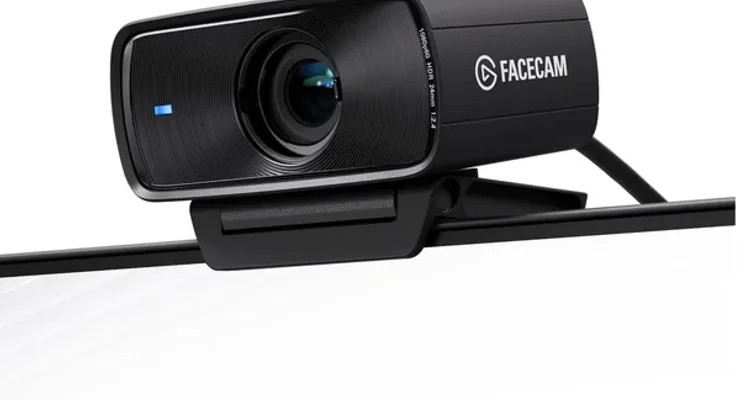 Photo: Elgato, Elgato.com
The Elgato Facecam MK.2 sends an uncompressed 1080p@60fps signal directly to OBS, Streamlabs, or Premiere - without the compression artifacts every other camera introduces. Fixed focus from 30 to 120 cm is an intentional choice: no autofocus hunting in the middle of a live stream.
No built-in microphone. That's not an oversight, it's a statement - this camera is for people who already have a serious mic. Camera Hub software gives fine control over colors and exposure without digging through OBS settings. A 2-meter USB-C cable is included.
| Specification | Value |
|---|---|
| Resolution | 1080p@60fps (uncompressed), 720p@120fps |
| Field of View (FOV) | 84° |
| Autofocus | Fixed focus (30-120 cm) |
| HDR | Yes |
| Microphone | None |
| Connection | USB-C |
| Price | 149.99 EUR |
Pros: Uncompressed signal, highest possible 1080p quality without artifacts, no autofocus hunting during live streams, USB-C with long cable, Camera Hub for fine-tuning
Cons: No built-in microphone, external mic required, fixed focus demands precise positioning, no adjustable FOV
Our opinion: For streamers who already have a microphone and sit at a fixed distance from the camera, the Facecam MK.2 is the logical choice. For working from home without a mic - no, because you need external audio.
5. Anker PowerConf C200 - Best Value Webcam for Home Office
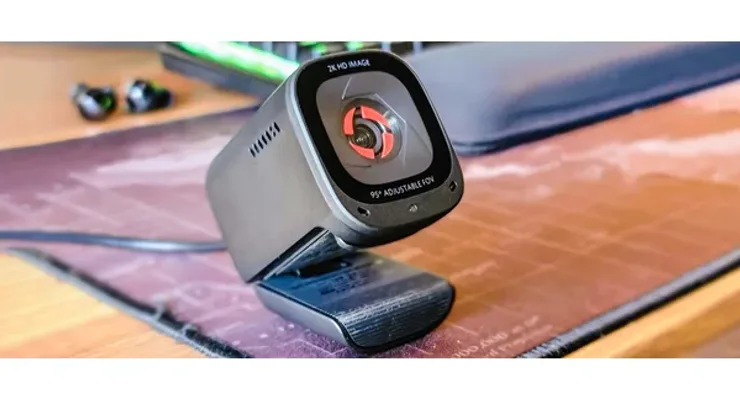 Photo: Anker, Anker.com
The Anker PowerConf C200 is a 2K webcam for under 60 EUR with an FOV that adjusts from 65° to 95°. That combination doesn't exist on models that cost twice as much. Autofocus responds in 0.5 seconds according to (Source), keeping up with sudden head movements.
The physical privacy shutter is built into the body, not a separate cap you can lose. At this price, that's a detail that stands out.
| Specification | Value |
|---|---|
| Resolution | 2K (2560x1440)@30fps |
| Field of View (FOV) | 65° / 78° / 95° adjustable |
| Autofocus | Yes, 0.5s response time |
| Microphone | Dual noise-canceling |
| Connection | USB-A |
| Physical shutter | Yes (built-in) |
| Price | 59.99 EUR |
Pros: 2K for under 60 EUR - outstanding value, adjustable FOV rare in this class, fast 0.5s autofocus that tracks sudden movements, built-in physical shutter
Cons: 2K sometimes automatically drops to 1080p on certain platforms, weaker low-light performance than premium models, USB-A only without USB-C option
Our opinion: For most home office users who don't want to spend more than 60 EUR, the C200 is the complete answer. Adjustable FOV and fast autofocus at this price don't exist anywhere else.
6. EMEET SmartCam C960 - Budget Webcam for Occasional Calls
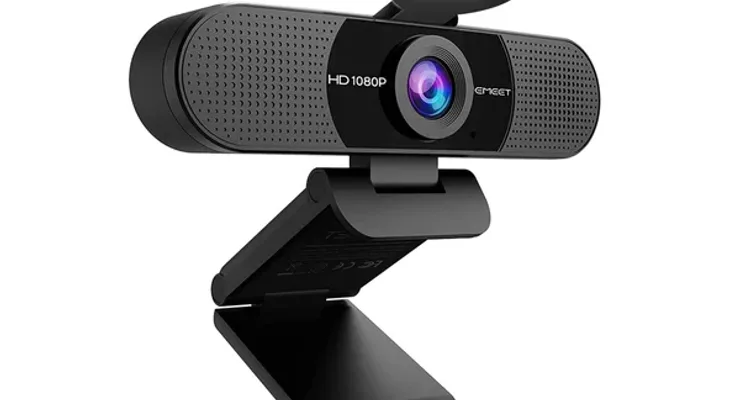 Photo: EMEET, EMEET.com
The EMEET SmartCam C960 is for people who don't use a webcam as a primary tool - one or two calls a week, no need for 4K. Real-time AI lighting correction handles bad conditions better than you'd expect for the price, and the dual AI microphones capture voice clearly even in noisier spaces.
Plug-and-play compatibility works without driver installation on Windows, Mac, and Chromebook. For under 45 EUR, the EMEET C960 is a solid baseline - according to (Source), it ranks among the best-value models in the lower price bracket.
| Specification | Value |
|---|---|
| Resolution | 1080p@30fps |
| Field of View (FOV) | 90° |
| Autofocus | Yes, automatic |
| AI lighting | Yes, real-time correction |
| Microphone | Dual AI noise-canceling |
| Connection | USB-A, plug-and-play |
| Price | 44.99 EUR |
Pros: Affordable price under 45 EUR, AI lighting correction for dark spaces, dual microphones with AI noise filtering, plug-and-play without drivers
Cons: Only 1080p@30fps without a 60fps option, plastic housing less robust than metal, no physical privacy shutter
Our opinion: For students, freelancers who occasionally have client calls, and anyone who doesn't need a camera every day - the C960 is enough. You're not asking for more than this at 45 EUR.
7. Microsoft Modern Webcam - Webcam for Teams Users
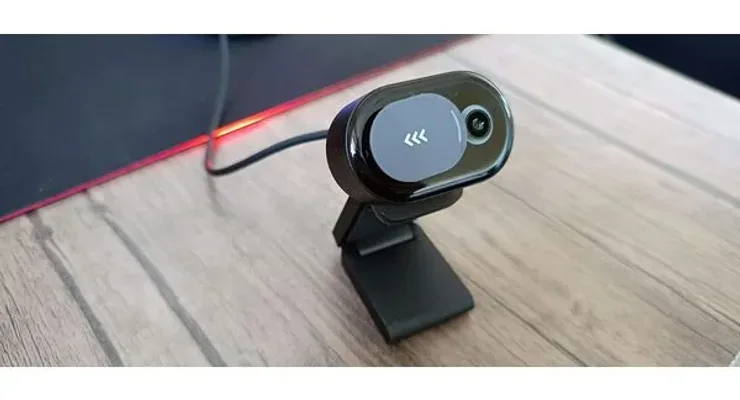 Photo: Microsoft, Microsoft.com
The Microsoft Modern Webcam is the only camera on this list with Teams certification - meaning it's optimized and tested for integration with the app. True Look technology adjusts contrast and white balance for a more natural look without post-processing, and you notice it immediately on the first call.
For users who work in the Microsoft 365 ecosystem with daily Teams calls, this camera removes any compatibility questions. The compact design and cable management are built with a desk in mind. The 74° FOV is narrower than most competitors, but for solo work from home it's perfectly adequate.
| Specification | Value |
|---|---|
| Resolution | 1080p@30fps |
| Field of View (FOV) | 74° |
| True Look technology | Yes |
| Autofocus | Yes |
| Microphone | Yes, built-in |
| Connection | USB-A |
| Teams certification | Yes |
| Price | 74.99 EUR |
Pros: Teams certification for optimal integration without setup, True Look for a more natural appearance on calls, compact design with smart cable management, plug-and-play on all Windows versions
Cons: No USB-C connection, 74° FOV narrower than most competitors in its class, no physical privacy shutter
Our opinion: If you use Teams every day and don't want to think about compatibility, the Microsoft Modern Webcam solves the problem. For everything else, the Logitech Brio 500 at the same price offers more.
Conclusion - Which Webcam for Working from Home Is Right for You?
Choosing a webcam for working from home in 2026 comes down to one question: how often do you use video conferencing? For daily Teams and Zoom calls, investing in the Logitech Brio 500 (110 EUR) or Anker PowerConf C200 (60 EUR) pays off - the image quality difference is visible to everyone on the call. For occasional calls once a week, the EMEET C960 at 45 EUR is perfectly sufficient.
Streamers and creators who work in dark rooms need the Razer Kiyo Pro Ultra or Logitech MX Brio for their larger sensors that capture more light. The Elgato Facecam MK.2 is a special case - the only choice for an uncompressed signal if you already have a quality microphone.
If you use Microsoft Teams exclusively and want zero configuration, the Microsoft Modern Webcam is the safest pick in the under-75 EUR class.
| User profile | Recommendation | Price |
|---|---|---|
| Daily video calls, general use | Logitech Brio 500 | 109.99 EUR |
| Maximum value for money | Anker PowerConf C200 | 59.99 EUR |
| Occasional calls, budget | EMEET SmartCam C960 | 44.99 EUR |
| Premium + low light | Logitech MX Brio 4K | 229.99 EUR |
| Streaming + dark room | Razer Kiyo Pro Ultra | 299.99 EUR |
| Streaming with external microphone | Elgato Facecam MK.2 | 149.99 EUR |
| Exclusively Teams users | Microsoft Modern Webcam | 74.99 EUR |
For a complete work-from-home setup, combining a good webcam with a quality home office microphone gives a professional impression that competes with studio equipment.
Frequently Asked Questions
Which webcam for working from home is best for Teams and Zoom?
For Teams and Zoom, a 1080p webcam is enough - platforms cap video at that resolution. The Logitech Brio 500 (110 EUR) offers excellent lighting and USB-C, while the Microsoft Modern Webcam (75 EUR) comes with Teams certification. 4K cameras have an advantage because of their larger sensor which works better in low light, but for the video displayed on calls, 1080p is sufficient.
Is 1080p enough for working from home in 2026?
Yes, 1080p remains the gold standard for video conferencing in 2026. Teams, Zoom, and Google Meet support a maximum of 1080p. 4K cameras have an advantage in sensor size which captures more light - visible as better image in low light - but for clean calls 1080p is fully adequate and more bandwidth-efficient.
How wide an FOV does a home office webcam need?
For solo work from home, 65-78 degrees is ideal - it frames your face and upper torso. A wider FOV of 90-95° is useful for showing a whiteboard or working in groups. Adjustable FOV (Logitech, Anker) is the most practical option since it covers all scenarios without physical changes.
Does a webcam need a built-in microphone for working from home?
Built-in microphones on modern cameras with dual noise cancellation (Logitech, Anker, EMEET) are sufficient for occasional calls. For daily conferences or streaming, a dedicated USB microphone gives noticeably better sound. The Elgato Facecam MK.2 has no microphone - designed for those who already have external audio.
What's the cheapest webcam with good image quality for working from home?
The Anker PowerConf C200 (around 60 EUR) offers 2K resolution, adjustable FOV, and fast autofocus - the best value option. The EMEET SmartCam C960 (around 45 EUR) is even cheaper with 1080p and AI lighting for occasional use. Both work without driver installation on all platforms.
USB-A or USB-C webcam - which to choose?
USB-C is the newer standard that comes on modern laptops without adapters. USB-A is more universal - works on all computers. If you have a newer laptop with USB-C ports, pick a USB-C model (Logitech Brio 500, Elgato Facecam MK.2). For older computers with USB-A, the Anker C200, Microsoft Modern, or EMEET C960 are all fine.
How to improve webcam image quality without expensive upgrades?
Good front lighting (a ring light or a window in front of you) improves image more than a pricier camera. A neutral background or virtual background in Teams/Zoom looks professional. Position the camera at eye level - don't look down at a laptop camera because it creates an unflattering angle.
How We Tested and Selected
Our webcam roundup for working from home in 2026 was based on analysis of reviews from (Source), (Source), and (Source), plus specification checks on official manufacturer sites. Ranking criteria: image quality under different lighting conditions, autofocus speed and reliability, FOV flexibility, microphone quality, connection type (USB-C preferred), physical privacy shutter, and price-to-performance ratio.
Sources and References
- Best Webcams 2026 - Tom's Guide
- Best Webcams 2026 - Tom's Hardware
- Best Business Webcams - TechRadar
- Razer Kiyo Pro Ultra Review - PCWorld
- Anker PowerConf C200 Review - Tom's Guide
- Logitech Brio 500 Review - Tom's Hardware
Related Articles
- Top 7 USB-C Hubs for Laptop in 2026 - USB-C hub for connecting your webcam and other peripherals
- Top 7 Monitors for Working from Home in 2026 - Monitors for a complete home office setup