

In this comparison, soldering irons on Amazon.de cost from 39.81 euros for the simple Ersa Multitip C25 to 188.01 euros for the Ersa i-CON PICO MK2 soldering station. This guide is for hobbyists, students and anyone who fixes cables, builds Arduino projects or drones, but isn't sure whether they need a soldering station or a USB-C iron, what temperature is right for leaded and lead-free solder, or whether soldering fumes are harmful. The best soldering irons of 2027 are the Weller WE 1010 as the best station overall (159.00 euros), the Pine64 Pinecil V2 as the best USB-C iron (89.99 euros) and the Toolcraft TO-8962 as the cheapest digital station with ESD protection (72.94 euros). We compared seven models with live prices on 2 November 2026.
If you need to join two wires once a year, a basic iron is enough. If you solder boards more often than that, get something with temperature control.
Quick overview: the best soldering irons of 2027
All the soldering irons in this comparison are available on Amazon.de. Click a name to see the current price.
| Model | Type | Power | Temperature | Power supply | ESD | Price | Best for |
|---|---|---|---|---|---|---|---|
| Weller WE 1010 | station | 70 W | 100-450 °C | 230 V | yes | 159.00 € | Overall |
| Pine64 Pinecil V2 | USB-C | up to 88 W | adjustable | USB-C PD, DC | - | 89.99 € | Field and projects |
| Ersa i-CON PICO MK2 | station | up to 80 W | 150-450 °C | 230 V | no | 188.01 € | Precision work |
| Hakko FX-888DX | station | 65 W | 50-480 °C | 230 V | yes | 167.99 € | Tip choice |
| Miniware TS101 | USB-C | 45-90 W | 50-400 °C | USB-C PD, DC | yes | 74.00 € | FPV and RC |
| Toolcraft TO-8962 | station | 70 W | 160-480 °C | 230 V | yes | 72.94 € | Small budget |
| Ersa Multitip C25 | basic | 25 W | about 450 °C, no control | 230 V | no | 39.81 € | Occasional repairs |
The data comes from Weller, Pine64 and Kurtz Ersa pages, Hakko's manual, and distributors Electrokit (Miniware), Conrad (Toolcraft) and Weidinger (Ersa Multitip).
How to choose soldering irons
Soldering station, USB-C or basic iron
Soldering irons fall into three groups. A soldering station has a separate unit with temperature control, a display and a holder, so it's best for the bench and longer sessions. USB-C soldering irons, like the Pinecil and Miniware TS101, have the controller in the handle and run on a laptop charger or battery, so they're great in the field. A basic iron without control is the cheapest, but the tip overheats, oxidises faster and is more likely to damage sensitive components.
Power in watts
With soldering irons, power isn't temperature; it's the ability to keep the tip hot when it touches a big piece of metal. As a rule of thumb, 25 to 40 W is enough for boards and thin wires, while thick cables, battery connectors and heavy joints need 60 W or more. The Weller WE 1010 has 70 W, the Ersa PICO up to 80 W, and the Pinecil up to 88 W on 24 V DC, which is a lot for a 28-gram iron.
Temperature for leaded and lead-free solder
Leaded Sn63Pb37 solder melts at 183 °C, and Sn60Pb40 over a range of about 183 to 190 °C (LCSC). Lead-free SAC305 (96.5 % tin, 3 % silver, 0.5 % copper) melts at 217 to 220 °C (AIM). Recommended tip temperatures are 315 to 370 °C for leaded and 370 to 400 °C for lead-free solder. Hakko advises using the lowest temperature you can work with, because too high a temperature wears the tip faster (Hakko).
Leaded or lead-free solder
The EU RoHS directive (2011/65/EU) limits lead to 0.1 % by weight in homogeneous materials in electrical and electronic equipment placed on the market (EUR-Lex). The directive covers devices that are sold, not solder wire for home repairs, so leaded solder can still be bought. For hobbyists it's easier to work with because it melts at a lower temperature, but it needs more hygiene. If you're repairing a device you'll sell, use lead-free.
Safety: rosin fumes and lead
Whatever soldering irons you use, the smoke you see from rosin flux when soldering isn't harmless: the UK's HSE says it is a common cause of occupational asthma (HSE). Solder in a ventilated room or with fume extraction, not leaning over the board. Stony Brook University advises washing your hands with soap after soldering and not eating or drinking at the bench, because lead on your hands is easily swallowed (Stony Brook).
Tip care
All soldering irons need tip care. Clean the tip with a damp sponge or brass wool, never a dry sponge. Hakko warns never to file the tip, because that shortens its life. After work, coat the tip with fresh solder so it doesn't oxidise, and if it turns black, apply solder with flux and wipe until the oxide comes off. DigiKey advises against harsh abrasives (DigiKey).
1. Weller WE 1010
 Photo: Weller, Amazon
The Weller WE 1010 is a digital soldering station with a 70 W WEP 70 iron and a range of 100 to 450 °C. It heats from 50 to 350 °C in 28 seconds with a temperature accuracy of ±5 °C. The station is ESD-safe, has standby and automatic setback, and settings can be password-locked, which is useful in a school or workshop.
The box contains the station, the iron, a safety holder with sponge and one ET tip. Genuine Weller ET tips are easy to find and cost about 6 to 12 euros each. For the WEP 70, Weller specifies the long L versions of the H, K, O and S shapes. Temperature is set with buttons, which is slower than a rotary knob. It runs on 230 V only, so it's for the bench, not the field.
| Feature | Detail |
|---|---|
| Power | 70 W (WEP 70) |
| Temperature | 100-450 °C, ±5 °C |
| Heat-up | 28 s to 350 °C |
| ESD | yes |
| Features | standby, auto setback, password lock |
| Tips | Weller ET series |
| Station weight | 1.40 kg |
| Price | 159.00 € |
Pros: fast heat-up and stable temperature, ESD, standby and password lock, genuine tips easy to find.
Cons: mains power only, button controls, genuine tips cost more than Chinese copies.
Our opinion: If you solder at least once a month, the WE 1010 is a safe buy. It isn't the fastest or the cheapest, but it lasts for years and you'll find tips anywhere.
2. Pine64 Pinecil V2
 Photo: Pine64, Amazon
The Pine64 Pinecil V2 is a 28-gram smart soldering iron powered via USB-C PD (12-20 V, 3 A) or a DC jack (12-24 V). On 24 V DC it delivers up to 88 W, and with a 20 V, 3 A USB-C charger about 64 W (Pine64). It has a small OLED display, a motion sensor that puts it to sleep when you set it down, and open-source IronOS firmware.
No charger is included: Pine64 recommends a 65 W, 20 V USB-C PD charger, and with a 12 V charger the iron heats more slowly. Some chargers and power banks aren't compatible; there's a list on the Pine64 wiki. No stand is included, so you buy a holder and sponge separately.
| Feature | Detail |
|---|---|
| Power | up to 88 W (24 V DC), about 64 W (20 V PD) |
| Power supply | USB-C PD 12-20 V 3 A, DC 12-24 V |
| Display | 0.69" OLED |
| Features | motion sensor, sleep, IronOS, BLE |
| Tip | ST-B2, compatible with TS100 tips |
| Weight | 28 g with tip |
| Charger | not included |
| Price | 89.99 € |
Pros: high power for its size, runs on a laptop charger, motion sensor, very light, cheap tips.
Cons: charger sold separately, slow heat-up with a weak charger, no stand included.
Our opinion: The Pinecil fits in a pencil case and heats like a station. If you already have a 65 W USB-C laptop charger, it's the best buy on the list.
3. Ersa i-CON PICO MK2
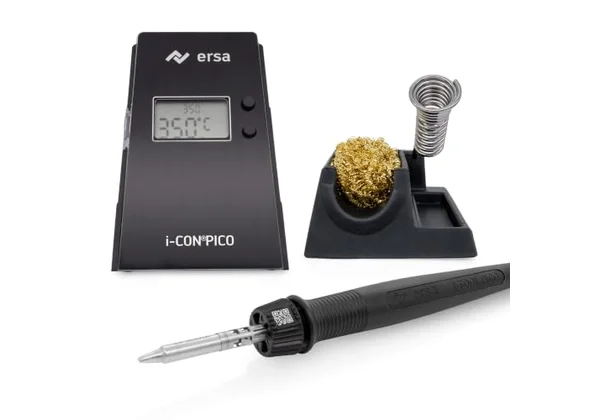 Photo: Ersa, Amazon
The Ersa i-CON PICO MK2 is a compact German station, only 80 mm wide, with an iron of up to 80 W and a range of 150 to 450 °C. According to Ersa it heats up in about 9 seconds, the shortest stated heat-up time in this comparison. The i-TOOL PICO MK2 iron is slim and light, so it's good for precision work and SMD components.
The station has three fixed temperatures or free adjustment, automatic standby and shut-off, and settings can be changed via PC software and a microSD card. It isn't an ESD-safe version, and an antistatic holder is sold separately. Ersa 142-series tips come in fewer shapes than Weller and Hakko tips. At 188.01 euros it's the most expensive in this comparison.
| Feature | Detail |
|---|---|
| Power | up to 80 W |
| Temperature | 150-450 °C, 3 fixed or free |
| Heat-up | about 9 s |
| ESD | no |
| Features | auto standby and shut-off, PC software, microSD |
| Tips | Ersa 142, TIP'N TURN |
| Dimensions | 80 x 145 x 103 mm, 1.05 kg |
| Price | 188.01 € |
Pros: fastest heat-up among the stations, slim iron for precision work, auto standby, compact unit.
Cons: not ESD-safe, most expensive, smaller tip range.
Our opinion: Nine seconds to working temperature quickly becomes a habit that's hard to give up. That, and the slim iron, is what you pay for with the PICO. For general use, the Weller offers similar performance for about 30 euros less, with ESD protection.
4. Hakko FX-888DX
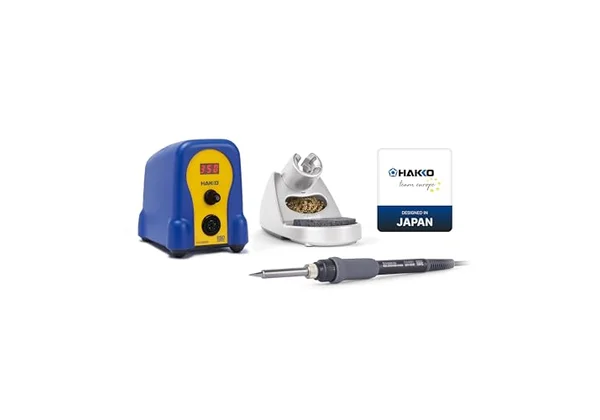 Photo: Hakko, Amazon
The Hakko FX-888DX is the successor to the legendary FX-888D, with a 65 W FX-8801 iron and a range of 50 to 480 °C. It holds temperature with ±1 °C stability and is adjusted with a rotary knob, with five memory presets. The station is grounded and ESD-safe, and settings can be password-locked.
Hakko T18 tips are easy to find, but cost about 12 to 15 euros each on Amazon.de. The box includes a holder with a large and a small sponge and a wire cleaner. The manual lists no automatic sleep or shut-off, and Hakko doesn't publish the heat-up time. When buying on Amazon.de, check the seller and that it has an EU plug.
| Feature | Detail |
|---|---|
| Power | 65 W iron, 100 W station consumption |
| Temperature | 50-480 °C, ±1 °C |
| Controls | rotary knob, 5 presets, password |
| ESD | yes, grounded |
| Tips | Hakko T18 |
| Accessories | holder, two sponges, wire cleaner |
| Station weight | 1.2 kg |
| Price | 167.99 € |
Pros: very stable temperature, rotary knob and presets, wide T18 tip range, wire cleaner included.
Cons: no automatic sleep, heat-up time not published.
Our opinion: The knob on the FX-888DX takes some getting used to, but once you're used to it, buttons on other stations feel slow. Just don't leave it on, because it won't put itself to sleep.
5. Miniware TS101
 Photo: Miniware, Amazon
The Miniware TS101 is the second smart USB-C iron in this comparison, with a range of 50 to 400 °C and a weight of 33 grams. According to the distributor it's ESD-safe; Pine64 gives no ESD rating for the Pinecil. Over USB-C PD 3.0 it delivers up to 45 W, and up to 90 W only with a PD 3.1 charger and a firmware update (Electrokit). Over the DC jack (9-24 V) it delivers up to 65 W, so it also runs on a LiPo battery up to 5S; the DC cable is sold separately.
The box contains the handle, a B2 tip, a USB-C cable and a stand, but no charger. A bundle with a 65 W charger costs about 89 euros. A maximum of 400 °C isn't enough for thick cables and sheet metal.
| Feature | Detail |
|---|---|
| Power | 45 W (PD 3.0), 90 W (PD 3.1 + firmware), 65 W (DC) |
| Temperature | 50-400 °C |
| Power supply | USB-C PD 9-28 V, DC 9-24 V |
| ESD | yes |
| Display | OLED |
| Weight | 33 g |
| Charger | not included |
| Price | 74.00 € |
Pros: ESD-safe, runs on USB-C and DC (battery), compact, cheaper than the Pinecil.
Cons: full power only with PD 3.1 and an update, 400 °C maximum, charger sold separately.
Our opinion: The TS101 makes sense if you solder next to a drone in a field, with a LiPo battery as the power supply. For the bench and thick cables, the Pinecil or a station is better.
6. Toolcraft TO-8962
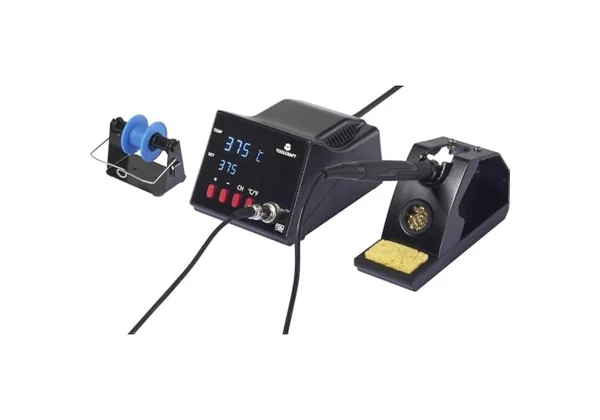 Photo: Toolcraft, Amazon
The Toolcraft TO-8962 is the cheapest digital station in this comparison: 70 W, a range of 160 to 480 °C and an ESD design for 72.94 euros. According to the distributor, it heats to 300 °C in about 10 seconds. A two-line display shows set and actual temperature at the same time, so you can see when the tip is ready.
Toolcraft is the retailer Conrad's own brand, so the range of tips is smaller than for Weller or Hakko. The station weighs 2.05 kg, and automatic sleep isn't confirmed in the specs. The box includes the station, an iron with tip and a holder.
| Feature | Detail |
|---|---|
| Power | 70 W |
| Temperature | 160-480 °C |
| Heat-up | about 10 s to 300 °C (distributor) |
| Display | two-line LED, set and actual |
| ESD | yes |
| Weight | 2.05 kg |
| Price | 72.94 € |
Pros: digital ESD station for under 75 euros, fast heat-up, shows set and actual temperature.
Cons: smaller range of tips, heavy unit, auto-sleep not confirmed.
Our opinion: The TO-8962 is a proper beginner's station. If you solder a few times a month and don't want to spend 160 euros, it won't hold you back.
7. Ersa Multitip C25
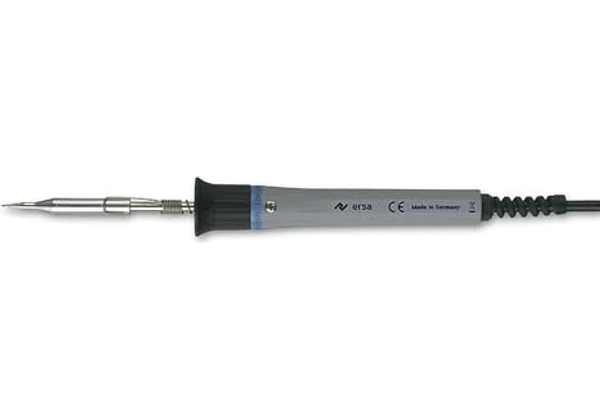 Photo: Ersa, Amazon
The Ersa Multitip C25 is a basic 25 W iron without temperature control, for 39.81 euros. The tip reaches about 450 °C, and heating up takes about a minute. It's light (34 g without cable), and the plated 1.1 mm ERSADUR tip lasts a long time and is good for small joints.
Without control, the tip overheats more easily, oxidises faster, and sensitive components are more likely to suffer. It isn't ESD-safe and has no standby. You buy a stand and sponge separately, and 25 W is too little for thick wires and heavy joints.
| Feature | Detail |
|---|---|
| Power | 25 W, 230 V |
| Temperature | about 450 °C, no control |
| Heat-up | about 60 s |
| Tip | ERSADUR 1.1 mm |
| Weight | 34 g without cable |
| Accessories | no stand |
| Price | 39.81 € |
Pros: lowest price, German brand, light, long-lasting tip.
Cons: no temperature control, slow heat-up, no stand, 25 W too little for larger joints.
Our opinion: The Multitip is for home repairs of cables and headphones. For 33 euros more the Toolcraft gives you control and a station, so if you plan to solder more often, skip this one.
Conclusion: which soldering irons to choose?
Soldering irons don't have to be expensive. For most hobbyists the best choice is the Weller WE 1010 at 159.00 euros, and if you already have a 65 W USB-C charger, the Pinecil V2 at 89.99 euros gives similar power in your pocket. The cheapest good station is the Toolcraft TO-8962 at 72.94 euros. All the soldering irons in this comparison work with leaded and lead-free solder, but whichever you choose, solder with ventilation and wash your hands afterwards.
| If you care most about | Choose | Price |
|---|---|---|
| Best station overall | Weller WE 1010 | 159.00 € |
| USB-C, field, projects | Pine64 Pinecil V2 | 89.99 € |
| Fastest heat-up, precision | Ersa i-CON PICO MK2 | 188.01 € |
| Rotary knob, tip choice | Hakko FX-888DX | 167.99 € |
| FPV, battery, ESD | Miniware TS101 | 74.00 € |
| Small budget, station | Toolcraft TO-8962 | 72.94 € |
| Occasional repairs | Ersa Multitip C25 | 39.81 € |
Along with an iron you'll want a digital multimeter to check joints, and a tool box to keep everything together. If you make enclosures for projects, see 3D printers, and for kids, science experiment kits.
Frequently asked questions
Soldering station or basic iron?
If you solder several times a month, get a station or a USB-C iron with temperature control. The tip lasts longer, you don't overheat components, and the solder behaves more predictably. A basic iron without control is enough only for occasional cable repairs.
How much soldering iron power do I need?
As a rule of thumb, 25 to 40 W is enough for boards and thin wires. For thick cables, battery connectors and bigger joints you need 60 W or more, because power determines how quickly the tip recovers its temperature after touching metal.
What is the right soldering temperature?
Leaded Sn63Pb37 solder melts at 183 °C, and lead-free SAC305 at 217 to 220 °C. Recommended tip temperatures are 315 to 370 °C for leaded and 370 to 400 °C for lead-free solder. Work at the lowest temperature at which the solder flows nicely.
Is leaded solder banned in the EU?
No. The RoHS directive limits lead in electrical and electronic equipment placed on the market, not the sale of solder wire. You can use leaded solder at home. Leaded solder is easier to use, but wash your hands afterwards and don't eat at the bench.
Is a USB-C soldering iron powerful enough?
Yes, with the right charger. The Pinecil V2 with a 20 V, 3 A USB-C PD charger delivers about 64 W, and the Miniware TS101 45 W on PD 3.0 and up to 90 W on PD 3.1. A weak 12 V charger means slower heating.
How do I clean a soldering tip?
With a damp sponge or brass wool, never a dry sponge or a file. After work, coat the tip with fresh solder so it doesn't oxidise. If it turns black, apply solder with flux and wipe until the oxide comes off.
How we chose
The soldering irons in this comparison were chosen by power, temperature range and stability, heat-up speed, power supply, ESD protection, tip availability and price. We looked at 10 models available on Amazon.de and checked every ASIN through the Amazon API. The data comes from Weller, Pine64 and Kurtz Ersa pages, Hakko's manual and distributors Electrokit, Conrad and Weidinger, and the advice on temperature, solder, safety and tip care from LCSC, AIM, the EU RoHS directive, HSE, Stony Brook University and DigiKey. We left out gas irons, which are for working without mains power. Prices are live Amazon.de prices on 2 November 2026. We didn't physically test the irons.
Sources and references
- Weller - WE 1010
- Pine64 - Pinecil specifications
- Pine64 - power and chargers
- Kurtz Ersa - i-CON PICO MK2
- Hakko - FX-888DX manual
- Electrokit - Miniware TS101
- Conrad - Toolcraft TO-8962
- Weidinger - Ersa Multitip C25
- LCSC - solder melting points
- AIM - SAC305
- EUR-Lex - Directive 2011/65/EU (RoHS)
- HSE - rosin and asthma
- Stony Brook University - soldering safety
- DigiKey - cleaning a soldering tip
Related articles: