


A real kids tablet is not just a smaller screen, but a learning tool with protection, parental controls and age-appropriate content. Kids tablets, with supervision and limits, can encourage reading, languages and creativity, instead of being just a digital babysitter. So we singled out the best kids tablets 2026, from Amazon Fire Kids models to Samsung and Blackview alternatives. For each we list the age, who it is best for and a rough price.
A good kids tablet has a durable case, strong parental controls and time limits, and content suited to the age. It is important to match the model to the child's age and to whether you want a closed and simple system or a more open Android. This guide is for parents who want a safe and useful device, with honest advice on control, screen time and how to fit kids tablets into learning.
Quick overview
These kids tablets cover every age and need, from preschoolers to schoolchildren and from a closed to an open system. Below is a quick overview before the details.
| # | Product | System | For whom | Price | Best for |
|---|---|---|---|---|---|
| 1 | Amazon Fire HD 10 Kids | Fire OS | 3-12 | ~180 EUR | Best overall |
| 2 | Amazon Fire 7 Kids | Fire OS | First tablet | ~110 EUR | Budget |
| 3 | Amazon Fire HD 8 Kids | Fire OS | 3-7 | ~150 EUR | Young kids |
| 4 | Amazon Fire HD 10 Kids Pro | Fire OS | 6-12 | ~200 EUR | Schoolchildren |
| 5 | Samsung Galaxy Tab A9+ Kids | Android | Open system | ~250 EUR | Android |
| 6 | Blackview Tab A7 Kids | Android | Durability | ~80 EUR | Affordable |
| 7 | Blackview Tab 6 Kids | Android | Creativity | ~90 EUR | With stylus |
1. Amazon Fire HD 10 Kids

Photo: Amazon
For most families, the Amazon Fire HD 10 Kids is the best and most versatile choice. It has a large 10-inch screen, a thick durable case, strong parental controls and a warranty that replaces the device if it breaks. For a safe tool for learning and fun under supervision, it is the first choice.
The large screen is comfortable for reading, educational apps and video, and the thick case protects the tablet from children's drops. Parental controls allow separate profiles, time limits and content selection, so the child sees only what you approve.
It is tied to the Amazon ecosystem and content, without a full Google Play store. But for a large screen, strong protection and a worry-free warranty, the Amazon Fire HD 10 Kids does the job well. Check dangerous apps for kids alongside it too.
| Specification | Detail |
|---|---|
| Screen | A large 10-inch screen for content and learning |
| Protection | A thick durable case against drops |
| Control | Strong parental controls and screen time |
| Warranty | Replacement if it breaks through the warranty |
Pros: a large screen and durable case, strong parental controls, a worry-free warranty on breakage.
Cons: tied to the Amazon ecosystem and content, without a full Google Play store.
Our opinion: We recommend the Amazon Fire HD 10 Kids as the first choice for most families. Protection, control and a warranty give parents peace of mind. It is tied to Amazon content, but for safety and value it is excellent.
2. Amazon Fire 7 Kids
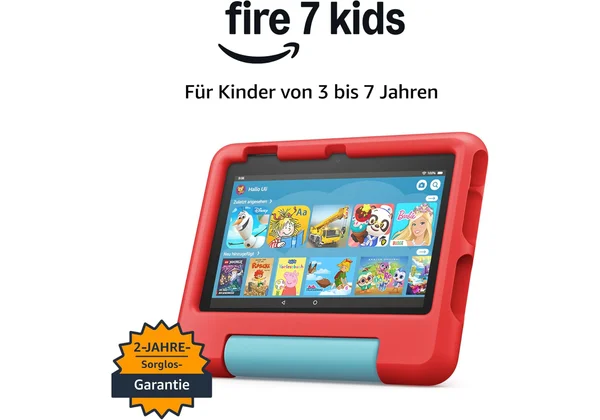
Photo: Amazon
For an affordable entry, the Amazon Fire 7 Kids is the cheapest kids Fire tablet with the same parental controls as more expensive models. A compact 7-inch screen and a durable case make it an ideal first tablet, without a big spend. For a first device or a spare, it is hard to find a better ratio.
The same parental controls mean profiles, time limits and content selection like larger models, at a lower price. A durable kids case protects the tablet from drops, so you do not worry with daily use.
It is smaller and slower than larger models, and tied to the Amazon ecosystem. But for the lowest price and the same control, the Amazon Fire 7 Kids is an excellent choice for a first tablet.
| Specification | Detail |
|---|---|
| Screen | A compact 7-inch screen |
| Protection | A durable kids case |
| Control | Parental controls and time limits |
| Price | The lowest price among Fire models |
Pros: the most affordable kids Fire, the same parental controls, a durable case.
Cons: a smaller and slower screen, tied to the Amazon ecosystem.
Our opinion: We pick the Amazon Fire 7 Kids for an affordable first tablet. The same control at a low price makes it safe for the start. The screen is smaller, but for a first device and budget it is excellent.
3. Amazon Fire HD 8 Kids

Photo: Amazon
For young children aged three to seven, the Amazon Fire HD 8 Kids is a compact and light tablet with a thick case and handle. It is adapted to small hands, so it is easy to hold and carry, and the case with a stand protects from drops and helps with viewing. For the youngest, it is the right choice.
The 8-inch screen is big enough for educational apps and stories, and the light housing is suited to preschool age. The thick case with a handle and built-in stand withstands children's dropping and makes use at the table easier.
For older children it is too small, and it is tied to the Amazon ecosystem. But for ages three to seven, thick protection and educational content, the Amazon Fire HD 8 Kids does the job well. Look at AI tools for children's learning for content too.
| Specification | Detail |
|---|---|
| Format | A compact 8-inch, light for small hands |
| Protection | A thick case with a handle and stand |
| Content | Educational apps for preschoolers |
| Control | Profiles and screen time for the child |
Pros: ideal for ages 3 to 7, a thick case with a handle, educational content for the young.
Cons: too small for older kids, tied to the Amazon ecosystem.
Our opinion: We pick the Amazon Fire HD 8 Kids for the youngest. A thick case with a handle and a light housing are perfect for small hands. For older kids take the 10-inch, but for preschoolers it is excellent.
4. Amazon Fire HD 10 Kids Pro

Photo: Amazon
For older children aged six to twelve, the Amazon Fire HD 10 Kids Pro has a slimmer case with a more grown-up look and more advanced control. With a filtered web browser and profiles suited to schoolchildren, it is a bridge between a kids and an adult tablet. For children who outgrow colourful cases, it is the right choice.
A slimmer case looks more serious and schoolchildren prefer it, and the large 10-inch screen is suitable for learning, homework and reading. Advanced parental controls and a filtered browser give more freedom with age-appropriate safety.
It is more expensive than the basic Kids models, and it is still tied to the Amazon ecosystem. But for ages six to twelve, a more grown-up look and a filtered browser, the Amazon Fire HD 10 Kids Pro is an excellent choice.
| Specification | Detail |
|---|---|
| Case | A slimmer case with a more grown-up look |
| Control | Advanced control and a filtered browser |
| Screen | A large 10-inch screen for learning |
| Age | For ages six to twelve |
Pros: a more grown-up look for older kids, a filtered web browser, advanced parental controls.
Cons: more expensive than the basic Kids models, tied to the Amazon ecosystem.
Our opinion: We pick the Amazon Fire HD 10 Kids Pro for schoolchildren who outgrow kids cases. A slimmer case and filtered browser give more freedom with safety. It is more expensive, but for ages six to twelve it is excellent.
5. Samsung Galaxy Tab A9+ Kids
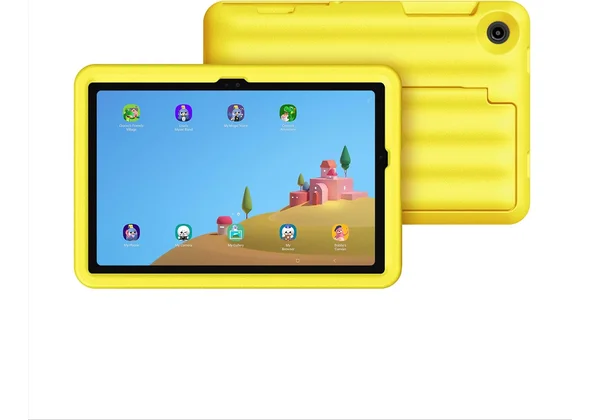
Photo: Samsung
For an open system, the Samsung Galaxy Tab A9+ Kids brings full Android and Google Play with a Samsung Kids mode. Instead of a closed ecosystem, it offers a wide choice of apps and school tools, and over time it turns into a regular tablet. For families who want flexibility, it is the right choice.
Full Android and Google Play mean access to educational apps, school platforms and services that Fire tablets do not have. Samsung Kids mode creates a safe kids interface with control, and a quality build and hardware last longer and grow with the child.
It is more expensive than Fire models, and a durable case is usually bought separately. But for full Android, Google Play and longevity, the Samsung Galaxy Tab A9+ Kids does the job well.
| Specification | Detail |
|---|---|
| System | Full Android and Google Play |
| Kids mode | Samsung Kids interface and control |
| Build | A quality Samsung build |
| Growth | Grows with the child into a regular tablet |
Pros: full Android and Google Play, Samsung Kids mode, grows with the child.
Cons: more expensive than Fire models, a case is bought separately.
Our opinion: We pick the Samsung Galaxy Tab A9+ Kids for families who want open Android. Google Play and Kids mode combine freedom and safety. It is more expensive and the case is separate, but for flexibility and durability it is excellent.
6. Blackview Tab A7 Kids
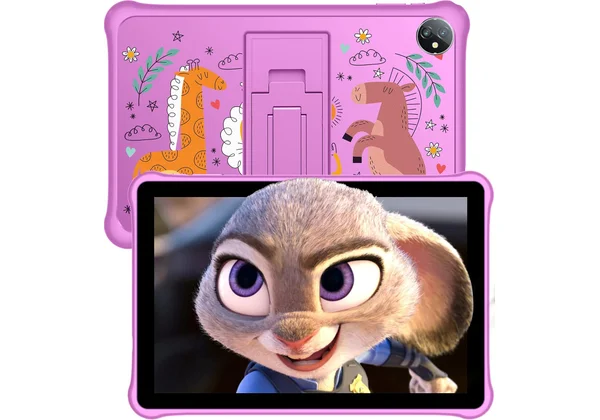
Photo: Blackview
For durability at a low price, the Blackview Tab A7 Kids is an affordable Android tablet with a strong protective case. It is resistant to children's drops and knocks, and offers parental controls and a kids mode, all at a very low price. For an affordable and sturdy first Android tablet, it is the right choice.
A strong silicone case protects the tablet from daily drops, and Android gives access to educational apps from the store. Parental controls and a kids mode allow profiles and limits, suited to younger children.
The hardware is weaker than premium models, and there is no special warranty on breakage like Fire Kids. But for a very low price, durability and Android, the Blackview Tab A7 Kids is an excellent choice.
| Specification | Detail |
|---|---|
| Protection | A strong silicone case against drops |
| System | Android with access to apps |
| Control | Parental controls and a kids mode |
| Price | A very affordable Android tablet |
Pros: very affordable and durable, a strong protective case, Android with apps.
Cons: weaker hardware than premium models, no special warranty on breakage.
Our opinion: We pick the Blackview Tab A7 Kids for durability at a low price. A strong case and Android cover the basics without a big spend. The hardware is weaker, but for an affordable and sturdy tablet it is excellent.
7. Blackview Tab 6 Kids
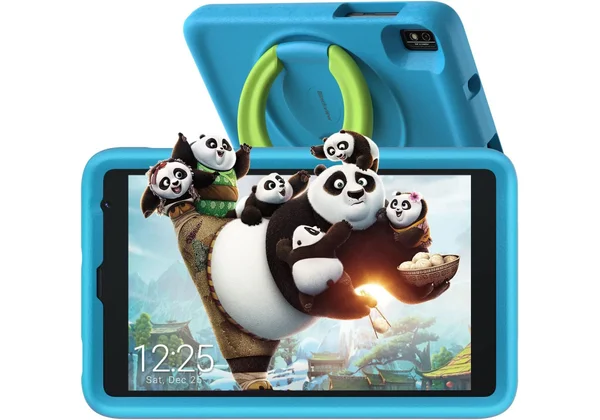
Photo: Blackview
For drawing and creativity, the Blackview Tab 6 Kids comes with a stylus, so along with learning it encourages drawing, writing and creative apps. Instead of just watching, the child creates, which develops fine motor skills and imagination. For little creatives, it is the right choice.
The included stylus opens apps for drawing, colouring and writing letters, and a protective case and kids mode keep the tablet safe. For early development through creative activities, the stylus adds value that ordinary kids tablets do not have.
It is compact and of basic hardware, and the stylus is simple, not premium. But for drawing, creativity and a low price, the Blackview Tab 6 Kids is an excellent choice. For more ideas look at STEM toys for kids.
| Specification | Detail |
|---|---|
| Stylus | Comes with a stylus for drawing |
| Use | Drawing, writing and creative apps |
| Protection | A protective case for children |
| System | Android with a kids mode |
Pros: comes with a stylus, encourages drawing and creativity, an affordable Android tablet.
Cons: compact and of basic hardware, the stylus is simple, not premium.
Our opinion: We pick the Blackview Tab 6 Kids for little creatives. The stylus encourages drawing and writing, not just watching. The hardware is basic, but for creativity and price it is excellent.
Kids tablets: buying guide
Kids tablets are chosen above all by age and system, so first choose the model according to the child's age. For the youngest aged three to seven the best are compact models with a thick case and handle, for schoolchildren aged six to twelve larger screens with more advanced control, and for teens more open Android tablets that grow with them. Amazon Fire Kids offers a closed and simple system, while Samsung and Blackview give full Android.
Then look at parental controls and protection. Strong parental controls with profiles, time limits and content filtering are key to safety, and a durable case is essential for younger children. Also check the warranty, because Amazon Fire Kids offers device replacement, while affordable Android models usually have no such coverage.
Finally, be realistic about the role of the tablet. A tablet is a learning tool under supervision, not a digital babysitter, so time limits and content selection matter more than the device itself. Experts advise avoiding screens for children under two, and after that limited and quality screen time with a balance of play and other activities. Many educational apps also work offline, which is safer. For safety look at dangerous apps for kids too.
Conclusion
The right choice of kids tablets depends on the child's age, the system and how much control and protection you want. For most families the best is the Amazon Fire HD 10 Kids, for an affordable entry the Fire 7 Kids, and for the youngest the Fire HD 8 Kids. For schoolchildren there is the Fire HD 10 Kids Pro, for open Android the Samsung Galaxy Tab A9+ Kids, for durability the Blackview Tab A7 Kids, and for creativity the Blackview Tab 6 Kids with a stylus.
Whatever you choose, set up parental controls before first use, match the model to the age and watch screen time. With supervision and quality content, kids tablets become a useful tool for learning and creativity, not a replacement for play and socialising.
| User profile | Recommendation | Price |
|---|---|---|
| Most families (best overall) | Amazon Fire HD 10 Kids | ~180 EUR |
| Affordable entry | Amazon Fire 7 Kids | ~110 EUR |
| Young children 3-7 | Amazon Fire HD 8 Kids | ~150 EUR |
| Schoolchildren 6-12 | Amazon Fire HD 10 Kids Pro | ~200 EUR |
| Open Android | Samsung Galaxy Tab A9+ Kids | ~250 EUR |
| Durability | Blackview Tab A7 Kids | ~80 EUR |
| Creativity with a stylus | Blackview Tab 6 Kids | ~90 EUR |
With the right choice of kids tablets and clear rules, the screen becomes a window into learning and creativity, not a source of worry. Choose the model by age, set up control and nurture a balance of screen and activities beyond it.
Frequently asked questions
Which kids tablet is best?
For most families the best is the Amazon Fire HD 10 Kids because of its large screen, durable case, strong parental controls and warranty. For the young the Fire HD 8 Kids is excellent, and for open Android the Samsung Galaxy Tab A9+ Kids. The leading brands are Amazon, Samsung and Blackview.
From what age a tablet for a child?
Experts advise avoiding screens for children under two, and after that with supervision and time limits. Tablets with kids content are suitable from around three years, with parental accompaniment. It is important that the tablet is a learning tool, not a replacement for play and socialising.
Does a kids tablet have parental controls?
Yes, kids tablets have parental controls that limit screen time, content and apps and create separate profiles for each child. On Amazon Fire Kids this is built in, and on Android you use Google Family Link or Samsung Kids. Setting up the control before first use is key.
How much time can a child spend on a tablet?
Recommendations advise limited and quality screen time, for example around an hour a day for preschoolers, with content supervision. More important than the minutes is the balance with play, sleep and other activities. Parental controls help set daily limits and breaks.
Is a tablet good for learning?
Yes, with quality educational apps and supervision a tablet can encourage reading, languages, maths and creativity. Content selection and the parent's role are key, because a tablet is a tool, not a babysitter. The best results come when the screen is combined with conversation and activities off the screen.
Does a kids tablet need the internet?
Not necessarily, because many educational apps and content can be downloaded and used offline, which is safer for children. For updates and new content the internet is useful, but with a filtered browser and supervision. Offline mode reduces risks and data costs while travelling.
How we chose
In compiling this list of kids tablets we relied on independent tests and recommendations, rather than marketing. We checked the data through a kids tablet test at Tom's Guide, a review at TechRadar and screen time guidelines from the American Academy of Pediatrics.
We deliberately mixed closed Fire and open Android kids tablets, so that every age and approach finds its own. We placed special emphasis on parental controls, protection and honesty about the role of the tablet in learning. Prices change through the year, so we listed them roughly, in euros.
Sources
- Best kids tablets 2026 - Tom's Guide
- Best tablets for kids 2026 - TechRadar
- Amazon Fire Kids tablets - Amazon
- Screen time for children - American Academy of Pediatrics
- Kids and screens guide - Common Sense Media
- Children and technology - Cleveland Clinic